AHEC IT has been conducting a phishing awareness exercise, and it looks like you interacted with a simulated phishing email. Don’t worry — this was a safe test designed to help us all stay sharp against real threats.
Phishing attacks are one of the most common ways cybercriminals gain access to sensitive information. This exercise helps us practice spotting suspicious messages before they cause harm.
Here’s what you can do next:
Review the red flags in the test email:
Sent from a lookalike domain: ahec.zip
Email with External Sender banner:
Review the Password Reset Procedure detailed below:
Stay alert — if something feels off, report it to support@ahec.edu immediately.
AHEC Password Reset Procedure:
AHEC IT, Senior Leadership, or Agency Department Directors will NEVER send an email instructing users to change their password. The Password Expiration/Reset Process is detailed below:
Windows System Passwords expire every 90 days
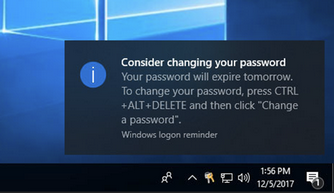
Users will receive a notification beginning (5) business days before their password expires, in one of (2) ways.
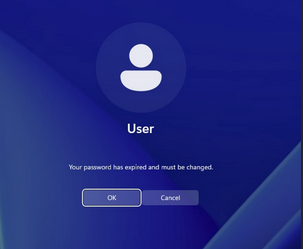
Logging into the computer – users will receive the message below when their password is about to expire:
The Warning Pop-up: When a user logs in to a computer connected to the domain, a box appears with a message similar to: "Your password will expire in X days. Do you want to change it now?"
User Action Required
Once you receive one of these (2) warnings, you can change the password immediately by pressing CTRL+ALT+DELETE and selecting "Change a password".
Password Requirements
Must be at least 8 characters
Cannot reuse your past 24 passwords
Password Complexity Requirements:
Passwords may not contain the user's Account Name or display name.
The password contains characters from three of the following categories:
o Uppercase letters (A through Z)
o Lowercase letters (a through z)
o Base 10 digits (0 through 9)At least one Special Characters: ~!@#$%^&*_-+=`|(){}[]:;"'<>,.?/
THANK YOU!
Your participation in these exercises helps protect not only your account but also our entire organization. Thank you for taking the time to learn and improve your phishing detection skills.